Performance testing on Azure VMs, App Services, and Container Instances (Part2)

Refer to my previous article we have tested simulated Sales order processing using NETCore web API connected to Azure SQL . by hosting on Azure virtual Machin with a single instance and multiple instances scale set.

After that, I have published my project to Azure with 3 different platforms to comparing performance between a particular Azure service as follows

    1. Virtual Machine: Link

    2. App Services: Link 

            2.1 Single Instances  S1

            2.2 Dual Instancese  S1 

            2.3 Single Instances  P1V2  (Scale-up)

            ** Because I testing in the Azure trial Environment, so I cannot use the Isolate plan to create an app service 

    3. Container Instances

            3.1  Single Instances 

            3.2  Dual Instances

            3.3  Single Instances (Scale-up)


The condition to test is 

Simulate sales order place from end-user. 100 users commit every 1 second over  minutes Duration


3. Container Instance

3.1 Single Instances

-    Size  1 CPU/1.5 GiB Memory.


-Average Response Time 7024  /Response Counts success 6177 / Timeout  Zero


Azure SQL database5796 Orders have been inserted.


3.2 Dual Instances

-    Size is the same as scenario 3.1
-    I use Application Gateway to handle load balancer by configuring Frontend Public IP to Backend Pool with Container Public IP.


-Average Response Time 3352  /Response Counts success 12,096 / Timeout  Zero
Azure SQL database: 12,173 Orders have been inserted from different container instances.


3.3  Container Instances Scale-up 

I do create a Container with double size.

- Size 2 CPU core/ 3 GiB memory


-Average Response Time 4571  /Response Counts success 9675 / Timeout Zero


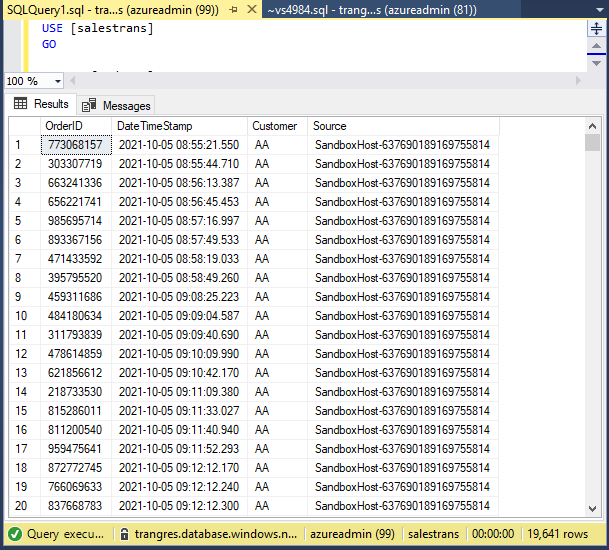
Azure SQL database: 19,641 Orders have been inserted.


Conclusion: 


for me, the test resource was impressive for container instances.

Hope my lab gives you ideas about 3 Azure computing services. I wouldn't say which one is the better solution. It's base on your technology and environmental condition.

In my opinion. I think the container is portable and easy to deployment so in the next article, I will try to leverage the container base with my Project. 


Thanks for you visit my blog


Performance testing Azure computing Services: VM, App services, and Container Instances (Part1)

Refer to my previous article we have tested simulated Sales order processing using NETCore web API connected to Azure SQL . by hosting on Azure virtual Machin with a single instance and multiple instances scale set.


After that, I have published my project to Azure with 3 different platforms to comparing performance between a particular Azure service as follows

    1. Virtual Machine:  Link

    2. App Services

            2.1 Single Instances  S1

            2.2 Dual Instancese S1  

            2.3 Single Instances  P1V2  (Scale-up)

            ** Because I testing in the Azure trial Environment, so I cannot use the Isolate plan to create an app service 

    3. Container Instances


The condition to test is 

Simulate sales order place from end-user. 100 users commit every 1 second over  minutes Duration


2. App Service

   2.1 Single Instances   S1    


-Average Response Time 15,636 ms  /Response Counts success 435 / Timeout  2,423


- Azure SQL: 3,016 
Orders have been inserted.


2.2 Dual Instancese S1  (Scale-Out)

I have configured the Manual scale to 2 Instances count.

-Average Response Time 8,656 ms  /Response Counts success 4613 / Timeout  419

- Azure SQL: 5,230 Orders have been inserted.


2.3 Single Instances   P1V2

because there is so much error in the first and second tests of App-service. seems S1 services plan cannot handle large request scenario. So have scale-up service planning to P1V2


- Change the size to  P1V2   210 total ACU   3.5 GiB Memory


-Average Response Time 7,073 ms  /Response Counts success 6038 / Timeout  105


- Azure SQL: 6211 Orders has been inserted.


Now we have completed all 3 scenarios of App service 

We will continue for Container Instance on Part2: Link


Create and Publish NETCore web-API running on Azure container Instance

Refer to this article I'm testing for VM scale set by hosting the web-API on IIS inside Virtual manchin: Link: Testing Azure VMs Autoscale with the Load balancer

In this article, I will use the same source code as the previous lab to create the container instances rather than VMs

There is 3 part 

First: Create Net core web API from Visual Studio 2019

Second: Publish project to Azure container registry 

Third: Create Azure container instances and Run


   First part

1. Create Project: Select ASP NET Core Web API


2. Project Name and Local file


3.  Addition Information

- Target Framework Choose Netcore 5
- Enable Docker >> Windows


4.  New Project has been created


5. on the First run. The system will pull data for provisioning contianer.


6. Web browser open automatically for swagger UI


*** Before go to publish step. I add a couple classes (Inventory Update, Database connection to Azure SQL)
This coding will simulate the ERP sales order Logic and consume CPU usage for performance testing purposes

*** This logic will use the same as future testing with Azure computing service


SQL Utility : .


Sales Order commit under HTTP POST method.


Second Publish project to Azure container registry 
1.  Menu Build >> Publish


2.  Select Azure container Registry


3. Select Resource group, Location to deploy on Azure.


4. Publish Success


Third: Create Azure container instances and Run

1. On target, Azure resource group already has Container registry created


2. Select Repository and Run


3. Defined Container Instance config value
4. Testing API by sending HTTP GET method from Container instance public IP


Right now The container has been ready to test

Next  Article I will compare the performance of different Azure computing services base on my scenario

Testing Azure VMs Autoscale with the Load balancer

In the previous article, I'm set up a Virtual machine Scale set (VMSS) behind a load balancer with a manually adjust number of VMs: Migration on-premise ERP(Legacy) to Azure Part 3 : Config VMs scale sets

In this article. I will be going to make 3 scenarios to test how a load balancer working.  and try to config VM auto-scale feature by Simulate Application server running IIS in a scale set  by trigger HTTPS request to the application server for creating Sales order record in Azure SQL


Environment provisioning 

1. Create Virtual Machin Scale set with two scenario

    - Manual scale set 2 VMs

    - Auto Scale Set  2 => 4 VMs


-Size of VM

    using small  VMs size (B1s) because I want to see the movement of  CPU and Ram during high workload.

    - Configuration  Loadbalancer

    Loadbalancer will allocate requests from clients to VMs that are behind in the backend pool. In this case backend pools are VM scale sets.


2. Create Azure SQL for Database Ties 


3. Create a simple application using C# hosting on the IIS  connected Azure SQL


    Because my ERP application server requires more dependency and takes time to install. So I going to create a Web API using C# to simulate the Sales Order logic functionality. another article for Create Net Core web API using C#: Create and Publish NETCore web-API running on Azure container Instance


4. Use Postman to check the connection from Client to App and database tier working find before initial huge request test. if the transaction is complete the server will return the order number.


Testing Stage

    I  simulate sales order requests from clients by using loading.io 


by condition 

How does my server perform when 100 users connect every 1 second over  minutes Duration?


Test Result 

3.1 Single Instants


Average Response Time 6361  /Response Counts success 1581 / Timeout 8


Sales transaction has been inserting to SQL only on application server VM.


3.2  Two Instants  manual scale set


Average Response Time 3008  / Response Counts success  13,141 Zero Timeout 


Sales transaction has been inserting into SQL from two VMs Instant


3.3 Configulation autoscale    4 Instants


The initial of  VMs is 2 and can increase to 4 Instants maximum. By increase 1 Instant if CPU threshold an over 50%

when you config rule in azure if  Duration of rule less than 5 minutes. You will see a warning message as follow 

"Setting a duration less than 5 minutes may generate transient metric spikes that lead to unexpected scaling actions. For best results, the duration should be set at least to 5 minutes"


After 5 Min The VM status is starting because the VM may need some time provisioning process.So this round only 2 VMs working for Request the resource not different from 3.2


So I wait till all 4 Instant are started then trigger the request


Average Response Time 1822  / Response Counts success  19,472 /  Timeout 82 


Sales transaction has been inserting into SQL from four VMs Instant


So the conclusion from my Lab  The VM scale set is working for elastic requests by config autoscale. it still a good idea for traditional software that requests running on VMs

But you may need to consider the Autoscale rule conditional.


Next Article I will testing about container-based applications on Azure.

Performance testing on Azure VMs, App Services Scalable, and Container Instances  (Part1)


Thanks for you visit my blog