Showing posts with label Azure. Show all posts

Azure Open AI connected to Dynamics 365 Customer Service | Case resolution (Thai Language)

Microsoft has announced that they will integrate Open AI GPT Technology into their Product such as 
Microsoft 365, and Dynamics 365 are called "CO-PILOT"  but currently when I create this article 
CO-PILOT support Thai Language is not available yet. Introducing Microsoft Dynamics 365 Copilot


 So I make this solution for my demonstration propose to show my customer how it works. By using  Azure open AI Service retrieves Case detail conversion from Customer service Omnichannel and summarizes Text  by following this step


1. Create  Azure Open AI  | You might need to input a request quote  to the Microsoft Product team


Create Open AI Service


Once you finished provisioning  you be able to Access  Azure AI Studio  select examples: Summarize issue resolution from conversion


You can see how AI summarizes conversion and you also finetune parameters on your right widget bar


Let's try with Thai language scenario, Open AI has summarized the conversion 

I have adjusted the temperature to 0.33  (Controls randomness. Lowering the temperature means that the model will produce more repetitive and deterministic responses. Increasing the temperature will result in more unexpected or creative responses. Try adjusting the temperature or Top P but not both.)


So now. If you OK with you trained model. It's time to deploy and make a connection with Dynamics 365 Customer Service


Click View Code to get Endpoint URL and Key Value Following Microsoft Doc


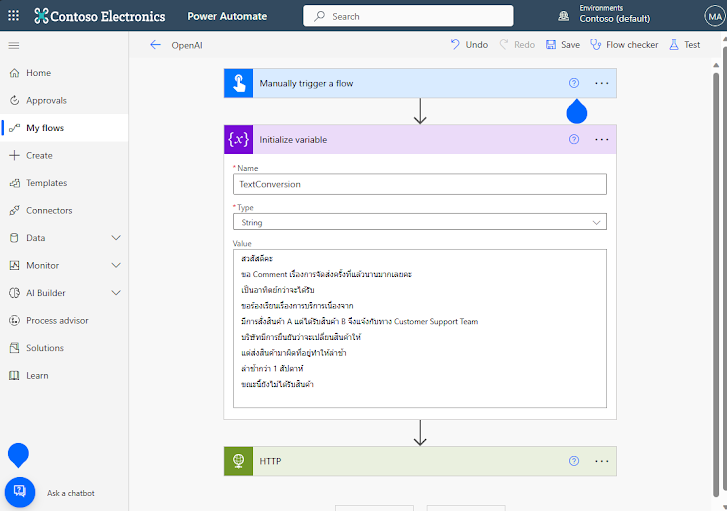
Create Microsoft Power Automate to trigger with HTTP Request 


Use the same example conversion in the Text variable


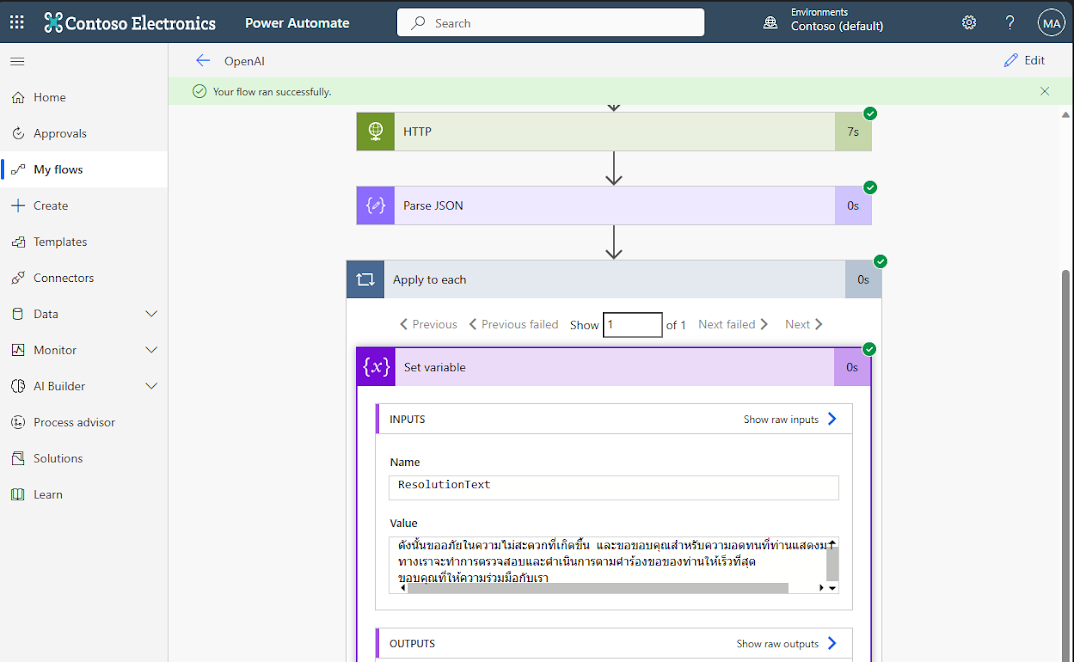
The power automation flow is working perfectly. We got a resolution text response on final step


It's time to move  to Dynamics 365 Customer Service part


The company Support agent may receive a Case via E-mail,  Chat, Phone Call (Need to enable Speech to text), or Power virtual Agenet conversion history before escalating to Agent

We can use the case detail description pass into Azure Open AI service by using Power Automate  as a connector 

I have modified the Power Automate form as a Cloud flow to trigger events from Dataverse that are used for Datastroage for Dynamics 365


As you can see.When the case context was logged. When then Agenet try to resolve Case  Power Automate will trigger by Dynamics 365 dataverse and call HTTP Request to Azure Open AI service


To improve AI accurate response, You can import Organization's Knowledge base to support AI suggestions more relevant to your Organization's business process. By the way, I'm waiting to try CO-PILOT Out of the box Feature in Dynamics 365  Customer Service to see how it's works with Thai Language


Thanks for your visit.

Implement NetCore Web API running on Azure Kubernetes Cluster (Part 1)


 Previously. I'm published 3 Articles about performance testing on Azure computing including

VMs, APP-Service, Container Insanctse by using Dotnet core application web API: Link


This article will apply the same Netcore Application for testing how the computing can handle large requests from clients and process to Azure SQL 

    There is 2 part for this testing

        Part 1. provision Azure Kubernetes Service

        Part 2. Execute testing


1. Once you have successfully build your application using NetCore Then you upload it to Azure Container Registry. I have already created an article for upload Netcore Application to Azure container follow the:Link  

2. On (Azure)Azure Container Registries  enable Admin user and copy login server for next step


.3 Preparing Image name by using ACR parameter as follow Login Server +"/" + Repositories + ":" + Tags


4. Create Azure Kubernetes Service


more than ACI container instances the AKS ability can support Availability Zone and Scalable


In this article, I will create 2 scenario

    - Manual Scale Sigle Node

   -  Auto Scale 1 - 2 Node 


5. On the AKS  integration tab refer to  target ACR using for Pull image


6 AKS has been created then copy connection string for next step


7. Prepare YAML file using VS Code

you can follow the step by this Julio Casal'syoutupe : Link


Replace image name from your ACR on this session


8. In VS code terminal /Run command to access AKS that you get from step 6
** Note you can also prepare YAML and execute from Azure could shell


apply YAML to AKS with command   Kubectl apply -f.\yourfile.yaml


go back to check on AKS workloads: you will see your container application has been deployed


Load balancer service has been deployed


9. HTTP request method POST from Postman. Status 200 applications are working properly on the Kubernetes cluster. We are good to go testing.


Part 2 Execute Testing: Comming soon


Performance testing on Azure VMs, App Services, and Container Instances (Part2)

Refer to my previous article we have tested simulated Sales order processing using NETCore web API connected to Azure SQL . by hosting on Azure virtual Machin with a single instance and multiple instances scale set.

After that, I have published my project to Azure with 3 different platforms to comparing performance between a particular Azure service as follows

    1. Virtual Machine: Link

    2. App Services: Link 

            2.1 Single Instances  S1

            2.2 Dual Instancese  S1 

            2.3 Single Instances  P1V2  (Scale-up)

            ** Because I testing in the Azure trial Environment, so I cannot use the Isolate plan to create an app service 

    3. Container Instances

            3.1  Single Instances 

            3.2  Dual Instances

            3.3  Single Instances (Scale-up)


The condition to test is 

Simulate sales order place from end-user. 100 users commit every 1 second over  minutes Duration


3. Container Instance

3.1 Single Instances

-    Size  1 CPU/1.5 GiB Memory.


-Average Response Time 7024  /Response Counts success 6177 / Timeout  Zero


Azure SQL database5796 Orders have been inserted.


3.2 Dual Instances

-    Size is the same as scenario 3.1
-    I use Application Gateway to handle load balancer by configuring Frontend Public IP to Backend Pool with Container Public IP.


-Average Response Time 3352  /Response Counts success 12,096 / Timeout  Zero
Azure SQL database: 12,173 Orders have been inserted from different container instances.


3.3  Container Instances Scale-up 

I do create a Container with double size.

- Size 2 CPU core/ 3 GiB memory


-Average Response Time 4571  /Response Counts success 9675 / Timeout Zero


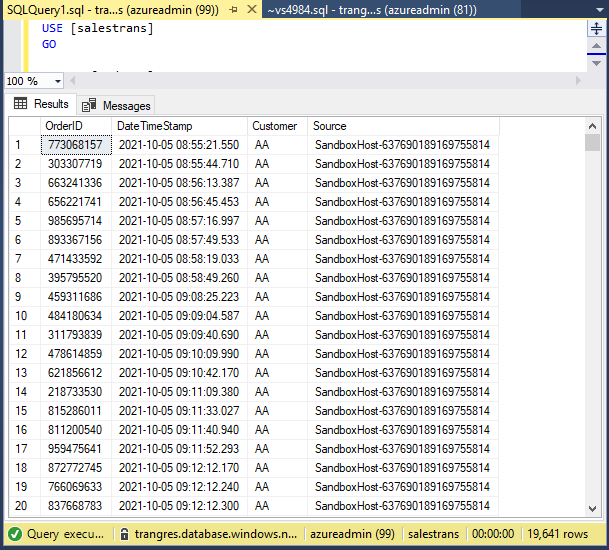
Azure SQL database: 19,641 Orders have been inserted.


Conclusion: 


for me, the test resource was impressive for container instances.

Hope my lab gives you ideas about 3 Azure computing services. I wouldn't say which one is the better solution. It's base on your technology and environmental condition.

In my opinion. I think the container is portable and easy to deployment so in the next article, I will try to leverage the container base with my Project. 


Thanks for you visit my blog


Performance testing Azure computing Services: VM, App services, and Container Instances (Part1)

Refer to my previous article we have tested simulated Sales order processing using NETCore web API connected to Azure SQL . by hosting on Azure virtual Machin with a single instance and multiple instances scale set.


After that, I have published my project to Azure with 3 different platforms to comparing performance between a particular Azure service as follows

    1. Virtual Machine:  Link

    2. App Services

            2.1 Single Instances  S1

            2.2 Dual Instancese S1  

            2.3 Single Instances  P1V2  (Scale-up)

            ** Because I testing in the Azure trial Environment, so I cannot use the Isolate plan to create an app service 

    3. Container Instances


The condition to test is 

Simulate sales order place from end-user. 100 users commit every 1 second over  minutes Duration


2. App Service

   2.1 Single Instances   S1    


-Average Response Time 15,636 ms  /Response Counts success 435 / Timeout  2,423


- Azure SQL: 3,016 
Orders have been inserted.


2.2 Dual Instancese S1  (Scale-Out)

I have configured the Manual scale to 2 Instances count.

-Average Response Time 8,656 ms  /Response Counts success 4613 / Timeout  419

- Azure SQL: 5,230 Orders have been inserted.


2.3 Single Instances   P1V2

because there is so much error in the first and second tests of App-service. seems S1 services plan cannot handle large request scenario. So have scale-up service planning to P1V2


- Change the size to  P1V2   210 total ACU   3.5 GiB Memory


-Average Response Time 7,073 ms  /Response Counts success 6038 / Timeout  105


- Azure SQL: 6211 Orders has been inserted.


Now we have completed all 3 scenarios of App service 

We will continue for Container Instance on Part2: Link